Are AI teaching tools actually helping teachers, or quietly getting in their way?
In 2026, educators are surrounded by AI. Slides can be generated in seconds, assignments graded instantly, and lesson plans drafted with a single click. But with so many “teacher-focused” AI tools on the market, a more important question emerges: do these tools truly support how teachers think and teach, or do they simply automate tasks without understanding intent?
This is where the difference between TutorFlow and Brisk Teaching becomes clear.
Both platforms position themselves as AI-powered workflow tools for educators, yet they solve fundamentally different problems. TutorFlow is designed for instructors who need to build, run, and manage structured courses inside a dedicated learning platform. Brisk, on the other hand, is built for teachers who want fast, in-context productivity inside existing Google or Microsoft workflows without changing how their classroom is set up.
So which approach actually works better for real classrooms? And more importantly, which one fits the way you teach?
Why do many AI teaching tools miss the teacher's intent?
Teacher-focused classroom workflow platforms with automated AI capabilities have encouraged educators to experiment with AI at scale. In the real world, AI tools are used to create K–12 instructional materials, act as data analyzers within MTSS instructional frameworks, support official university enrollment counseling, and even fill in as short-term tutoring support during ongoing teacher shortages.
Over the last few years, tools designed to optimize educator workflows have expanded rapidly. These include evergreen grammar checkers such as Grammarly, student-focused productivity assistants like Notion AI, and presentation generation tools such as Canva’s Magic features.
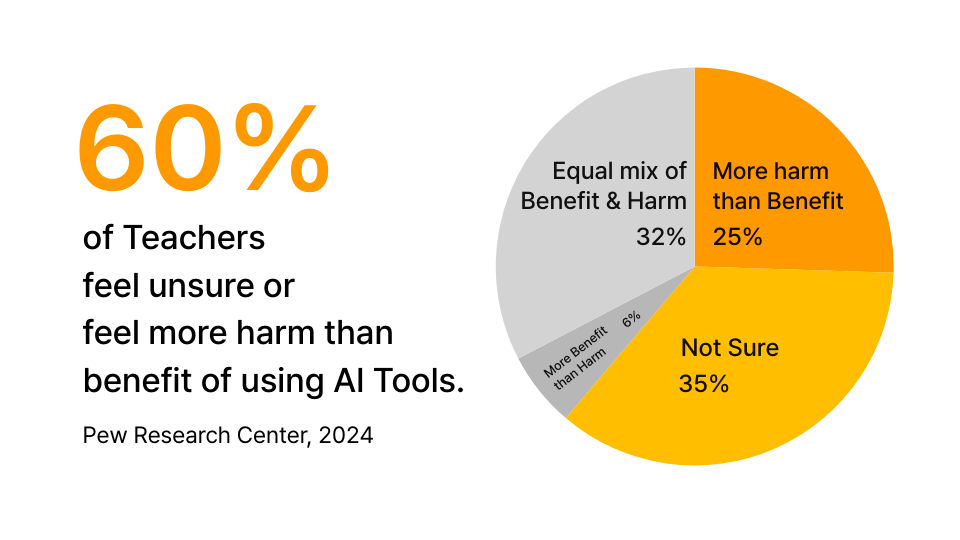
However, thousands of educators have also pushed back against automating their classrooms.
Discussions across education communities consistently point to impractical features, limited flexibility, and cluttered interfaces as major pain points for teachers.
Many educators and institutions critique AI tools altogether, arguing that poorly designed automation can offload critical thinking, flatten teaching styles, and weaken pedagogical decision-making. Teachers, after all, are responsible for crafting effective curricula, building meaningful learning experiences, and growing students' cognitive skills.
“The future of education begins with teachers. Teachers bring education to life. They build human connections that no device can replicate.”
— UNESCO Story "Teachers cannot be coded"
Much of the concern comes from the same place: many AI tools don't help teachers teach better. They take over tasks in a generic, context-blind way, without supporting the teacher's actual intent.
Can AI workflow toolkits support teachers without replacing them?
The most reasonable response is not to position AI as a replacement for teachers, but to reframe it as an assistant that supports a teacher's intent and purpose in the classroom.
We need tools that cater to how teachers actually work:
- integrate into existing workflows without interrupting creative flow
- offer meaningful customization while preserving teaching intent
- provide fast feedback and automation without weakening the teacher's role
One emerging solution is AI workflow toolkits.
AI workflow toolkits typically consist of a suite of tools designed to assist teachers while keeping full control with the educator.
These platforms usually offer utilities like grammar checkers, presentation generators, and quiz creators, providing a flexible framework teachers can adapt to their own plans and instructional style.
The best toolkits are designed to handle structure and coordination, not to replace a teacher's creative judgment or instructional voice. They reduce tedious, automatable work while leaving nuanced pedagogy to the teacher.
Brisk and TutorFlow are two promising examples of AI workflow toolkits that aim to empower educators in practical ways.

How TutorFlow helps teachers build structured AI-powered courses
TutorFlow is an online course-building and classroom management platform that supports integrated workflows, especially for technical and structured learning, including coding (such as Python) and external document-based content.
TutorFlow positions itself as an AI-powered course builder that helps educators design, manage, and deliver structured courses with full control. Its focus on course architecture makes it well suited for university instructors, professional tutors, curriculum designers, and educators running recurring or scalable programs.
The platform uses AI to outline an overall course plan, then lets instructors customize details such as modules, assignment structure, and grading rubrics. Earlier AI course builders like Mini Course Generator leaned heavily on full automation to generate "finished" courses, often producing generic outputs that were difficult to adapt, and rarely integrated cleanly with real teaching workflows.
TutorFlow follows a bottom-up course design approach: users generate a foundation inside the platform, then refine components such as modules, assignments, and rubrics incrementally. This keeps AI outputs flexible while still saving time. The learning management experience is polished, with a clean interface and detailed customization options.
What is Brisk Teaching, and when does it work best?
Brisk is a browser extension that provides 23+ AI tools and integrates with platforms such as Google Workspace and Microsoft 365.
Brisk Teaching functions primarily as a classroom productivity assistant. With its multi-tool capabilities, it acts as a complementary sidekick for teachers inside the tools they already use. Its toolset includes grammar correction, rubric generation, assignment grading, lesson planning, and quiz creation.
This model centralizes many AI utilities in a single extension. However, Brisk does not offer a standalone platform. For example, a teacher may create a rubric, grade assignments, and generate feedback using Brisk, but each action typically runs as a separate tool with limited shared context. Because these tools live inside a compact browser menu rather than a unified platform, cross-tool workflow continuity can be limited.
Brisk's strength lies in its compact, versatile toolkit. It is especially well suited for teachers who work day-to-day inside Google Workspace or Microsoft applications and want quick results without moving to a new system.
TutorFlow vs Brisk: which AI teaching platform fits your classroom?
TutorFlow is best for educators who manage structured classes and need an end-to-end system for course creation, delivery, assessment, and organization. University instructors, professional tutors, curriculum designers, and educators running recurring or scalable programs are strong candidates for TutorFlow.
Brisk is best for teachers who prioritize speed and convenience, especially K–12 educators, substitute teachers, and instructors who must operate inside external workspaces and want quick content creation and feedback without building course architecture.
Both platforms can save time in real classrooms. The difference is where they live in your workflow, and how much structure and continuity you need.
Feature comparison: course platform vs in-context AI toolkit
TutorFlow is an all-in-one AI course builder and smart classroom. It aims to create, deliver, and manage learning in a single platform. Brisk is a browser extension that adds 23+ essential “one-click” tools, optimized for Google/Microsoft workspaces.
Because these tools solve different problems, this comparison focuses on fit, not crowning a single winner.
TutorFlow's feature strengths (management + course architecture)
- Generate interactive course structures from prompts or existing materials (rubrics, syllabus) inside a dedicated workspace
- Classroom management tools (organize learners, set up cohorts, track progress, issue certificates)
- STEM-ready experiences (coding lab, math engine) as first-class features
- Plug-and-go tools for classroom flow: OCR handwritten equations, video subtitle export, multi-model comparison, AI writing detection, and assignment feedback
Brisk's feature strengths (assistant + classroom micro-tasks)
- 23+ core tools for teachers (lesson/quiz/material creation, slide support, assignment feedback)
- Inspect Writing: replay how a student's document was created (added/deleted/pasted) to review process
- Text leveler + translator (50+ languages on the free tier)
- Works inside popular workspaces (e.g., Google Docs/Slides), positioned as a “teacher sidekick”
Quick reality check
- If you need a home base for a structured course (content + delivery + data), TutorFlow is your solution.
- If you need fast creation + feedback inside Google/Microsoft, Brisk is the tool for you.
Which tool is easier for teachers to start using?
Brisk wins on instant usability due to its lightweight browser extension model. TutorFlow is still straightforward, but as a dedicated platform, it requires initial setup in exchange for deeper control and course structure.
Brisk: minimal friction
- Install extension → run tools inside Google Docs/Slides
- The interface is compact and in-context, reducing the learning curve for busy K–12 teachers
- Example: open a student essay → run Inspect Writing → watch the replay and generate feedback in minutes
TutorFlow: payoff onboarding
- You set up classes and content inside TutorFlow, but everything stays connected (materials → quizzes → learners → insights)
- Example: prompt → generate course structure → refine modules → enroll students → review with AI inside one system
How do TutorFlow and Brisk fit into a teacher's daily workflow?
TutorFlow acts as a single home base: you can create, deliver, assess, and analyze inside one platform. Brisk acts as a workflow accelerator: it improves steps inside Docs/Slides/LMS workflows without replacing them.
TutorFlow workflow (end-to-end)
- Create: generate courses, slides, and quizzes with AI, guided by your instructions
- Deliver: enroll learners and run interactive class experiences (including STEM formats)
- Assess + analyze: review auto-graded quizzes/exams and use reports to understand performance
TutorFlow's key advantage is that every function shares context within a single ecosystem, keeping content, learners, and data connected.
Brisk workflow (plug-and-go)
- Create: generate materials, rubrics, quizzes, and slides within Google/Microsoft tools
- Feedback loop: inspect a student's writing process and generate feedback in different styles (Glow & Grow / Next Steps / rubric-based)
- Differentiate: level text + translate for accessibility and ELL support
A key limitation is that Brisk cannot become the teacher's course “home.” Your system of record remains Google Classroom, an LMS, or shared drives.
How do their AI capabilities differ in real classrooms?
TutorFlow's AI is geared toward structured course design and running AI-supported classrooms. Brisk's AI is geared toward boosting teacher productivity inside documents and slides: drafting, feedback, leveling, translating, and quick generation in context.
TutorFlow: course management AI
- Generate course assets (interactive materials, quizzes/exams, slides, PDF outputs)
- Insights AI: summarize performance and highlight key learning signals
- Specialized tools: OCR math formula scanning, subtitle generation, multi-model comparison, and AI writing detection for assignments
Brisk: teacher task AI
- Free tier includes 23+ tools with usage limits (strong for daily classroom tasks)
- Inspect Writing provides a replay of how a document was produced (a unique classroom advantage)
- Premium upgrades (schools/districts): Turbo AI, fewer/no usage limits, advanced Inspect Writing, additional feedback styles
How much do TutorFlow and Brisk cost for teachers?
Brisk is free for individuals, with paid upgrades mainly for institutions and districts (plus an optional individual Pro tier). TutorFlow follows a traditional subscription model: a free tier for light use, and paid plans (starting around $18/month) for advanced course and classroom management.
TutorFlow plans
- Free: limited AI credits and limited classroom/learner capacity (e.g., 60 credits, 1 classroom, up to 10 learners)
- Pro: $18/month with ~500 AI credits/month
This structure is cost-effective for educators who want a dedicated system for courses and classrooms.
Brisk plans
- Brisk Educator Free: free tier with 23+ tools (with usage limits)
- Brisk for Schools & Districts: Turbo AI, expanded capabilities, and higher/removed usage limits
- Individual Educator Pro:
$99.99/year ($8.33/month), adding Turbo AI and upgraded features
While Brisk's pricing is not always fully transparent in one place, the above ranges reflect commonly cited tiers across education channels.
Go with TutorFlow if you need a curated, interactive course architecture, especially for STEM or technical classes like coding.
Choose Brisk if you want a workflow enhancement tool: a Swiss-army-knife style assistant inside your Google/Microsoft workspace.
Table comparison (pros & cons)
| Feature | TutorFlow | Brisk |
|---|---|---|
| Best for | Structured courses, STEM education, coding & AI training, corporate training | General automation & teacher toolkit |
| Onboarding style | Dedicated platform setup | Browser extension, plug-and-play |
| Audience | Educators, L&D teams | Educators, schools, districts |
| Service variety | Learning content creation + AI teaching tools | In-context productivity tools |

Practitioner insight (first-person, anecdotal)
The following perspective reflects firsthand teaching experience rather than formal research and is included to contextualize tool choice in real classroom conditions.
- A humanities or social-science major who has just started teaching middle school English will likely find Brisk the dominant choice right now. It is free, easy to use inside Google Workspace, and offers quick, practical tools. Brisk minimizes friction: Brisk is speed and convenience.
- For professors and instructors running their own courses, especially those who need structure, continuity, and course-level control, TutorFlow is the better fit. It offers stronger course management, deeper customization, and long-term leverage: TutorFlow is control, structure, and scalability.
Final framing
Ultimately, it's not about TutorFlow versus Brisk. It's about which AI teaching platform best fits your classroom workflow.
A clearer framing is:
- Brisk: versatile support tool, simple in-context utilities, workflow enhancement
- TutorFlow: structured course platform, integrated classroom management, complex instructional tasks
Ready to build your classroom with structure and intent?
If your teaching requires more than one-off tools, if you design courses, manage learners, and want AI to support your instructional goals rather than replace them, TutorFlow is built for that workflow.
TutorFlow helps educators turn ideas into structured, interactive courses while keeping full control over content, pacing, and evaluation.
👉 Explore TutorFlow and see how AI can support your teaching, not override it.
Start building with TutorFlow