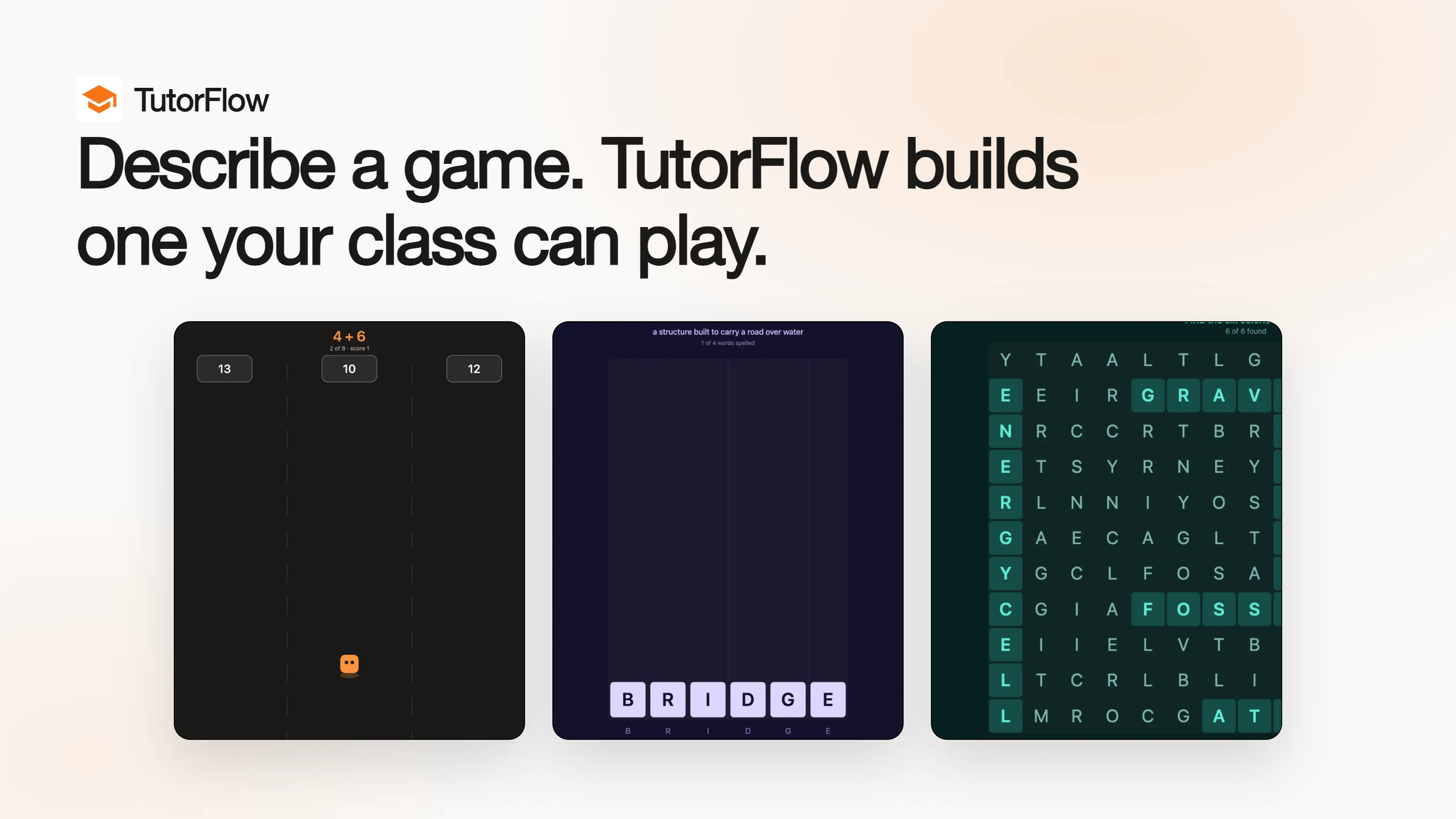
TutorFlow Games is now in beta. Describe the game you want in one sentence, and TutorFlow writes a plan you can edit, builds a playable browser game from it, and plays the game itself before handing it to you. You never open an engine or write a line of code.
The game is built around your lesson rather than chosen from a template. A Year 3 class stuck on subtraction across ten gets a game about subtraction across ten.
Why Teachers Stop Before They Start
Practice sticks better when it is a game. Almost every teacher knows this, and almost none of them make one.
The tools that exist mostly hand you a fixed shape. Quiz platforms give you a quiz with a leaderboard on top, which is the same multiple choice question in a brighter colour. Game builders give you a template, and the template decides what learners actually do. Neither of them knows that your Year 3 class needs subtraction across ten, or that your beginner English group keeps mixing up two words that look alike.
The alternative is commissioning a developer, which costs weeks and a budget nobody has for a single lesson.
So the game does not get made, and the practice goes back to a worksheet.
How One Sentence Becomes a Plan
TutorFlow Games starts where a teacher actually starts: a sentence about what learners should practise.
"A Tetris where the falling letters spell the word a clue describes."
From that, TutorFlow writes a plan before it writes any code. The plan is short enough to read in a minute and it is yours to change:
- The pitch and the core loop
- The mechanics, named one by one
- Levels, each with its own goal
- What wins a round, what ends it, and which keys do what
This ordering matters more than it sounds. Reading a plan takes a minute and costs one credit, so an idea that is not right for your class gets rejected before anything expensive happens. Only when the plan is right do you press build.
After You Press Build
A generated game that will not start is worse than no game at all. It burns the one thing a teacher cannot get back, which is the ten minutes in front of a class when the thing was supposed to work.
So nothing reaches the editor until TutorFlow has opened the game and played it:
- An automated check runs against every version, and a real run exercises the controls
- A version that fails is rebuilt rather than published
A build takes a couple of minutes, and you can leave the page while it works.
Editing then happens in a chat panel beside the game. Describe the change in your own words and the next version has it. "Make the falling blocks slower." "Use six letter words instead of five." "Give a second try before the round ends."
Every game keeps a full version history, and any earlier version can be restored as the newest one. If a revision makes the game worse, the version your class liked is still there.
Games You Can Play Right Now
We built three, one per subject, in the same beta everyone else is using. Each came out of a single sentence, and each is playable in a browser right now.
"A game where learners run into the lane holding the right answer."
Arithmetic Run puts a sum at the top of the lane and the answers in the lanes below it. The learner steers into the lane holding the right one. Built for a third-grade class practising addition and subtraction.
"A Tetris where the falling letters spell the word a clue describes."
Word Tetris is the sentence from the top of this post, built. The well is exactly as wide as the word, the pieces carry runs of letters, and a full row clears. A row whose letters each sit in their own column spells the word the clue described, and that is the one that scores.
"A word puzzle where six science terms hide in a grid, each with its meaning."
Science Word Search hides ENERGY, ATOM, ORBIT, CELL, FOSSIL and GRAVITY across and down a grid, each shown with its meaning beside it. Tap the first letter and the last, or drag between them.
What It Costs
Games use the same credits as the rest of TutorFlow, and the three steps are priced separately on purpose:
- The plan costs 1 credit. Rejecting an idea should be cheap.
- A build costs 40 credits. This is the step that writes and checks a whole program.
- A revision costs 40 credits. It rewrites the game with your change applied.
You can see every content type's credit cost on the pricing page.
What Beta Means Here
Games is live for every classroom on TutorFlow today. Calling it beta is about what we still expect to change.
Here is one we already got wrong. A build ran for five and a half minutes, failed its checks twice, and then the editor went quiet. The page looked exactly as it had before the button was pressed, and nothing on it said why. We found the reason in a server log, which is not where the teacher was looking. A failed build now stays in the thread beside the game where it can be read, and a build gets a third attempt before it gives up.
The rest of what we expect to change:
- 2D games are the well-trodden path. 3D works and is worth trying, and it is the newer of the two.
- A build is a whole program written in one pass, so an ambitious brief occasionally comes back rejected. Building again usually clears it.
- Games run entirely in the browser with no network access, which keeps them safe to hand to a class and also means anything needing live data is out of scope for now.
Start With a Sentence
The fastest way to judge this is to play one. Open Arithmetic Run and see whether a class of yours would play it for ten minutes.
Then write your own sentence. Go to TutorFlow Games, describe the practice your learners actually need, and read the plan before you build. The plan is where you will know whether this works for your subject, and it costs one credit to find out.
Frequently Asked Questions
What is TutorFlow Games?
TutorFlow Games is a content type inside TutorFlow that turns a one-sentence description into a playable browser game. It writes an editable plan first, builds an HTML5 game from the approved plan, plays the game to check it runs, and lets you revise it in plain language. Games are published to a classroom and played by learners in the browser, with no install.
What kinds of educational games can it build?
It builds 2D and 3D browser games around whatever your lesson needs: arithmetic practice, vocabulary puzzles, science terminology, workplace safety scenarios, and code-reading exercises among them. The three examples in this post are a lane runner, a Tetris variant, and a word search, each generated from one sentence.
Do learners need an account or an install to play?
No. A published game runs in any modern browser from the lesson it belongs to. There is nothing to download and nothing to configure, which is what makes it usable on school hardware.