TutorFlow lets educators use a PDF or PPTX as reference material when creating a course or a test. Start with a small file, review what was extracted, then check the generated lessons and answers against your source. Course creation and standalone test creation are separate workflows.
Try the same source in two formats
Download the five-page Python list totals PDF or the five-slide PowerPoint version. Both contain the same beginner Python material: a running total, an empty list, negative numbers, and a deliberately misplaced reset. The editable source includes the expected answers.
These are instructor-authored reference files for your own trial. They are not exported results from a TutorFlow generation run.
For a different subject, choose a short section of your own material with one clear teaching objective. Keep essential facts in visible text. Check diagrams, tables, formulas, and code after extraction rather than assuming every visual detail will survive conversion.
Check the file before generating
The file analysis service uses these limits:
| File | Analysis scope |
|---|---|
| Text-based PDF | Up to 200 pages |
| PDF using OCR | Up to 50 pages |
| PPTX | Up to 60 slides |
Upload limits depend on the creation flow and your classroom's storage policy. In course creation, Build from materials accepts a reference pack and asks you to mark one file as the syllabus. Our development classroom showed up to 20 files, 20 MB per file, and 50 MB total. The standalone test reference control accepts one file up to 20 MB. Check your upload screen for the limits that apply to your classroom.
A file being accepted does not mean every page was analyzed. Read the analysis status and any truncation warning. If the extracted text is missing or incomplete, split the source, improve the scan, or try the OCR option where offered before generating. An empty extraction is not evidence that the course accurately uses the file.
Draft the course
- Open the course creation flow in your educator workspace and describe the audience and objective.
- Choose Build from materials, add the PDF or PPTX, and mark the main file as the syllabus. Select Analyze references and wait for the analysis status before continuing.
- Answer the audience, objective, and teaching-method questions. In course plan settings, choose a short duration and a small number of lessons. Turn off assignments or slide drafts if you do not need them.
- Create the course plan, check its order and lesson formats, and confirm it. Wait for lesson generation to finish, then verify that the finished content is still present after reopening the lesson.
- Review every example and activity before making the course available in your classroom.
For the sample file, use this prompt:
Create a short beginner Python course using the attached reference. Learners already know integer variables and print(). Teach a running total with a for loop, trace [3, 5, 2], test an empty list and negative numbers, and fix the misplaced reset. Do not use sum(). Include an explanation, a coding practice task, and a short knowledge check. Use English.
The file is a reference, not a promise to reproduce the original layout. TutorFlow drafts editable teaching content; inspect whether it preserved the concepts you need.
Create the assessment separately
Open test creation and attach the same source. Set the question count, language, question types, and scoring in the setup controls as well as describing your intent in the prompt. In our trial, the setup still showed 20 questions after a prompt requesting four; we changed the count to four before generation.
Create four beginner Python questions using the attached reference: trace the total for [3, 5, 2]; explain why total starts before the loop; predict the empty-list result; and write a loop for [-2, 5] without sum(). Include correct answers and explanations. Use English.
Review the test independently of the course. A correct lesson does not guarantee a correct answer key. The test creation guide covers question setup and export.
Check the result against the source
| Check | Expected result for this sample |
|---|---|
| Normal input | [3, 5, 2] produces 10 |
| Empty input | [] produces 0 when the total is initialized before the loop |
| Negative number | [-2, 5] produces 3 |
| Single item | [4] produces 4 |
| Deliberate bug | Resetting inside the loop makes the given nonempty example print 2 |
| Teaching constraint | The practice solution uses a loop, without sum() |
Run the code and check indentation. If a generated question accepts more than one answer, rewrite it or accept the valid alternatives. Keep a copy of the original draft and note the changes you made, such as adding the empty-list case or correcting an explanation. This makes a second trial easier to compare.
What happened in our trial
On October 16, 2026, we used these files in a TutorFlow development classroom. The PDF produced one coding lesson with three quizzes. The generated code returned 10 for [3, 5, 2] in the browser. The lesson also explained the empty-list, negative-value, single-item, and misplaced-reset cases. One retry was needed before a completed lesson was saved.
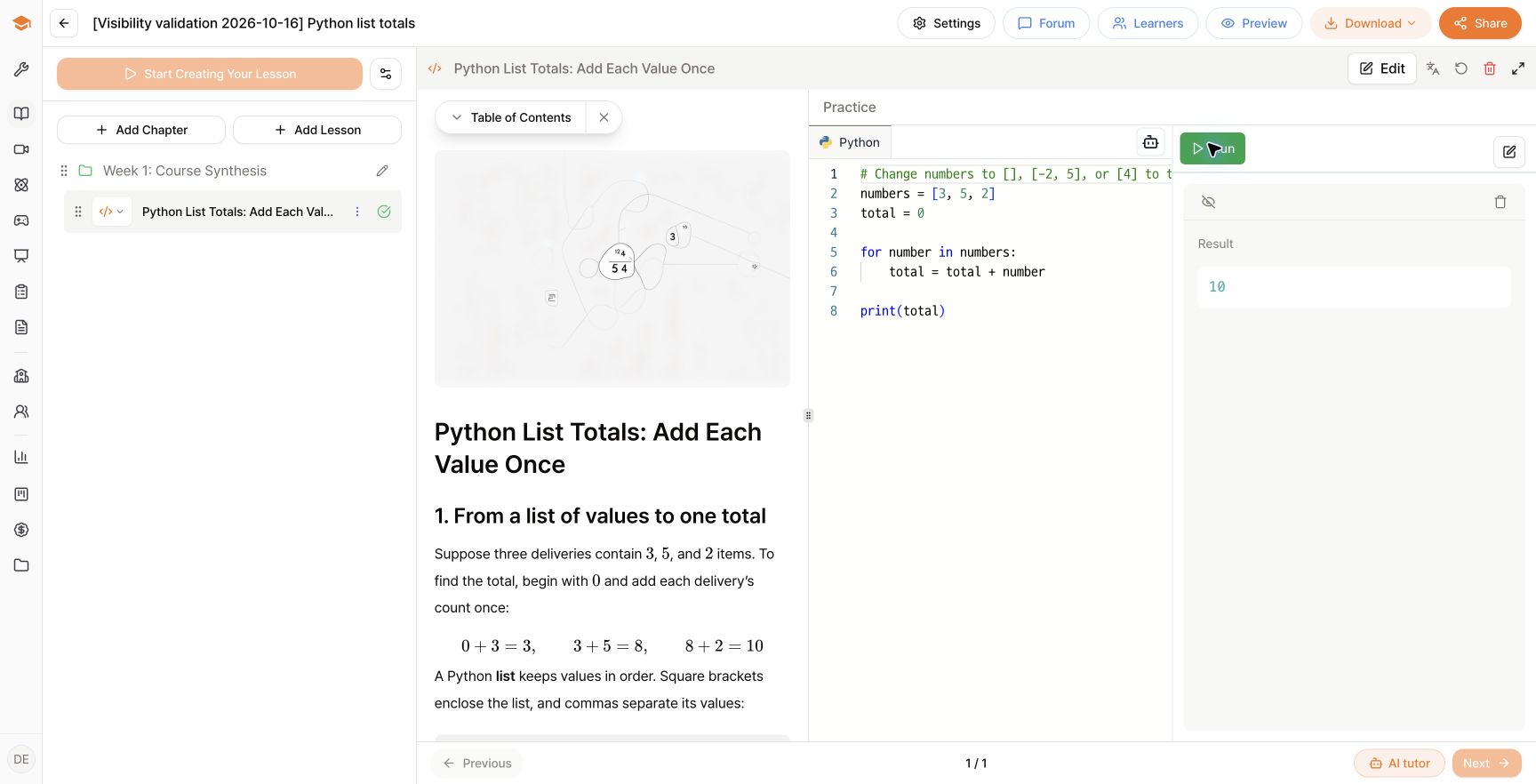
Open the full-size result screenshot
The PPTX produced four open-ended questions. Their explanations matched the source, but review found two items to correct: empty Example Answer fields and scores that did not match the three-point rubrics in the question text. We added example answers, set each question to three points, and adjusted the passing score for the resulting 12-point total.
Read the generated excerpts and review record for the code, question topics, edits, settings, and observed balances. This is one development-environment trial, not a guarantee that every file will produce the same result. Reopen your saved lesson or test and check it before sharing.
Record credit use for your trial
An outline and a complete course are different amounts of work. Lesson generation, attached files, questions, and additional media can affect the total. Check the current credit usage table and the estimate in the creation flow.
Our displayed balance fell by 10 credits across the PDF course plan, one completed lesson after a retry, and the PPTX test. This was a balance observation, not an itemized billing audit or a fixed per-file price.
Record your balance before and after each stage: file processing, outline creation, lesson generation, and test generation. Include any retries and additional content. If other people are using the same workspace, use its usage history to distinguish your trial from their activity. Do not treat one balance difference as a universal price for every PDF.
Explore the learner experience
Open the Python course example to inspect an existing course and the Python test example to see assessment content. These are separate public examples, not outputs from the sample file above.
For a deeper activity, follow coding courses or AI practice courses. Start by generating one small draft from your own file, then use the checks above before sharing it.
Frequently asked questions
Can I turn a PDF or PowerPoint into an editable course?
You can attach a PDF or PPTX as reference material in course creation. Review the extracted text and generated content. This creates a teaching draft rather than a slide-for-slide copy.
Can I make a test from the same file?
Yes. Use the standalone test creation flow with the same reference file, then choose the question formats and review the answer key.
Will every page, image, and formula be preserved?
Check the analysis limits and warnings. Complex layouts, scanned pages, code indentation, and formulas require review. Split long files or correct the reference when extraction is incomplete.