TutorFlow Video Generator is now in beta. Type a topic, set a length, pick a voice, and TutorFlow produces a complete narrated educational video. AI writes the script, records the narration, finds matching video clips, adds animated captions, and renders the finished file. No camera. No microphone. No editing software.
If making teaching videos has always felt like too much work, this is what we built.
Why Most Educators Never Make Videos
Video is the most effective format for online learning. Learners complete more, retain more, and engage more with video than with text alone. Most educators know this. The problem is everything that stands between knowing and actually publishing a video.
Recording means finding a quiet room, setting up equipment, doing multiple takes until it sounds right, and still ending up with something that feels unpolished. Editing means software that takes months to learn. Even when educators have the motivation, the production process drains it.
So the video stays in the draft folder. The course ships with a PDF instead. Learners get a worse experience because the better one took too long.
TutorFlow Video Generator removes that barrier entirely. You bring the topic. The rest is automated.
How AI Creates a Complete Video from a Single Prompt
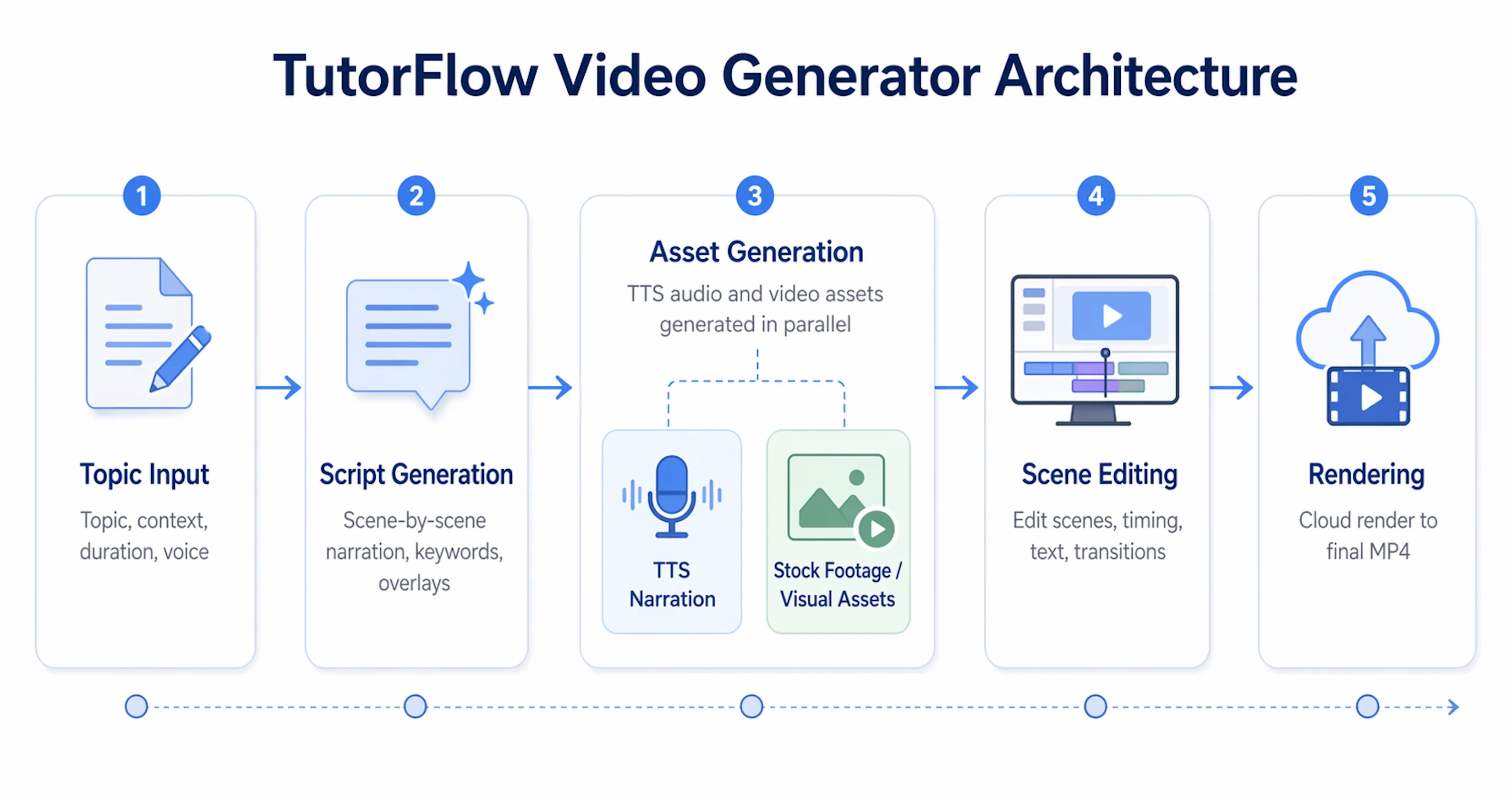
1. Describe your video: Enter a topic, optional background context, a target length, and whether you want a female or male voice.
2. AI writes the script: TutorFlow drafts a scene-by-scene narration, selects the right text layout for each scene, and identifies the best visuals to pair with the narration.
3. Narration and visuals are prepared automatically: AI records narration for every scene and finds matching video clips, all running at the same time in the background.
4. You refine in the scene editor: The editor opens right away. Adjust the script, swap any clip, change the caption style, reorder scenes, and watch the full video preview before you render.
5. Render the final video: One click produces the finished video file, ready to download or share in a few minutes.
What You Can Change in the Editor
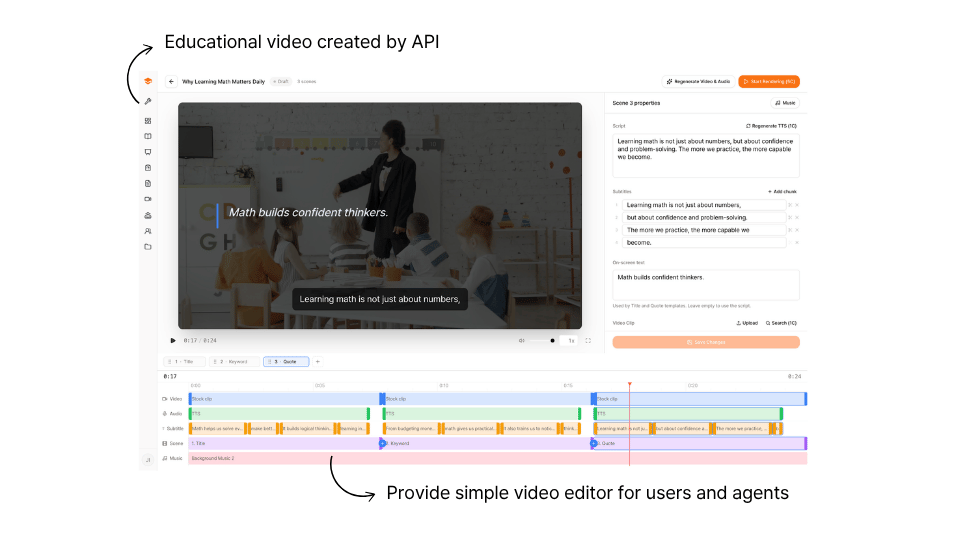
The scene editor gives you full control without requiring any video editing experience. Everything is visual, and changes show up in the preview instantly.
Narration: Edit what gets said in any scene. Refresh the AI voice for that scene with one click.
Video clips: Search for a different clip by keyword, pick from a visual grid, and swap it in. Or upload your own footage for free.
Caption style: Each scene uses one of four layouts:
| Style | What it looks like |
|---|---|
| Keyword | Captions at the bottom with key terms highlighted above |
| Title | Bold centered text for openings and section breaks |
| Quote | Italic text with a left accent bar, for definitions or key takeaways |
| Clean | No text overlay, just narration and visuals |
Captions: Auto-generated and synced to the narration. Adjust timing, split lines, or add new ones from the caption panel.
Scene order: Drag any scene to reorder. The preview updates in real time.
Transitions: Click between any two scenes to set a transition: Cut, Fade, Slide, Wipe, Flip, Clock Wipe, or Iris.
Timeline: A visual track editor shows narration, captions, and video clips side by side. Drag to fine-tune the timing of each element.
Landscape for Courses, Vertical for Shorts
TutorFlow supports two formats, selected when you create the video.
| Format | Best for | Max length |
|---|---|---|
| Landscape (16:9) | Online courses, lectures, training content, onboarding | 10 minutes |
| Vertical (9:16) | YouTube Shorts, Instagram Reels, TikTok | 3 minutes |
Vertical videos are not landscape videos turned sideways. TutorFlow writes a completely different script for short-form: shorter scenes, a hook in the first few seconds to hold attention, and captions sized for mobile screens. Video clips are also chosen to fit the vertical frame naturally.
Use Your Own Script
Already have the words written? Paste your narration into TutorFlow instead of generating one from scratch.
TutorFlow takes your script as-is, splits it into scenes at natural sentence breaks, selects visuals and caption styles for each scene, and records narration from your exact text. Nothing is rewritten or summarized. Your words go directly to audio.
This is useful for instructors with existing lecture notes, trainers working from approved policy language, or anyone who wants full control over what gets said before production starts. Videos built from your own script cost 1 credit for the structuring step, compared to 3 credits for a full AI-written script.
Background Music
Add music to any video from the background music panel in the editor. Search by mood or topic, preview tracks before selecting, and mix one into the video at whatever volume you prefer.
Music loops automatically if the track is shorter than the total video. You can swap or remove it at any point before publishing.
Adding background music costs zero credits.
What It Costs
Video creation is charged per task, not per seat or subscription tier.
| Task | Credits |
|---|---|
| AI script generation | 3C |
| Your own script | 1C |
| AI narration, per scene | 1C |
| Video clips, per scene | 1C |
| Render | 5C |
A 10-scene video costs around 28 credits from first prompt to finished video. At 1 credit = $0.01, that is $0.28 per video.
Who This Is For
Educators building on-demand content: Turn a lesson into a 2-minute explainer. Add an intro video to every module. Publish video content without a production team or a recording setup.
Corporate training teams: Onboarding walkthroughs, policy overviews, product training, and compliance clips, produced consistently without booking studio time or waiting on contractors.
Educators creating short-form content: YouTube Shorts, Reels, and TikTok videos from the same topic that powers your courses. The vertical format is built for short-form platforms, not just cropped from landscape.
Instructors who already have their material: If the lecture notes exist, TutorFlow turns them into video without rewriting a word.
Get Started
TutorFlow Video Generator is available now in beta for all TutorFlow users. Open a classroom, go to Videos in the sidebar, and click Create Video.
Sign in at tutorflow.io/sign-in. For team plans or institutional access, reach out at contact@tutorflow.io.
Frequently Asked Questions
Do I need any video editing experience?
No. The AI handles script writing, narration, clip selection, captioning, and rendering. The scene editor is there if you want to make changes, but what TutorFlow produces is often ready to publish without any editing at all.
Can I upload my own video clips?
Yes. Any scene can use footage you upload instead of an AI-selected clip. There is no credit cost for uploading your own footage.
How long does it take to produce a video?
A 1 to 2 minute video is typically ready to download within a few minutes of hitting render. Longer videos take more time proportionally. TutorFlow shows progress while it works, and you can use other parts of the platform while you wait.
What languages does the AI narration support?
Language is detected automatically from your topic and script. Write in Korean and the narration is in Korean. Write in English and it is in English.
What is the difference between landscape and vertical format?
Landscape (16:9) is the standard widescreen format for courses and training. Vertical (9:16) is for YouTube Shorts, Instagram Reels, and TikTok. Beyond the dimensions, vertical videos use a shorter, hook-first script structure and larger captions for mobile viewing. The format is chosen at creation time and cannot be changed afterward.
Can I make changes and render again?
Yes. Edit the video any time and render again. Each new render replaces the previous one. Re-renders cost 5 credits.
What if a scene ends up with no narration or no clip?
Scenes with something missing are highlighted in the editor. You can fix each one individually by retrying narration, entering a different search term for the clip, or uploading your own footage. It usually takes less than a minute to resolve.