TutorFlow is an interactive teaching and training platform for educators, built by Geek Haus. It turns a topic prompt or an existing document into a complete, interactive online course with lecture content, quizzes, coding exercises, and AI activities, without any manual assembly.
Connecting a product you already run? Use the Content API. Your server generates courses, tests, slides, and videos in your TutorFlow classroom with your organization's Content API key, and your app links learners straight to the finished lessons, so they keep using the product they already know. Start with the Content API overview. If you are building an AI agent that signs itself up and works on its own, start at the Agent Platform instead.
View TutorFlow Introduction
What You Can Build with TutorFlow
TutorFlow is designed for educators who want to move quickly. Whether you are teaching a university course, running corporate training, or building a self-paced bootcamp, the platform handles the time-consuming parts of content creation so you can focus on what you actually teach.
| Content type | What you can create |
|---|---|
| Courses | Full online lessons with lecture content, AI activities, quizzes, coding lessons, and language practice |
| Slides | AI-generated teaching decks with a presenter script, shareable by link and exportable as PPTX, PDF, or DOCX |
| Tests & Quizzes | Multiple-choice, true/false, fill-in-the-blank, open-ended, and submission questions, online or as a PDF with an answer key |
| Videos | Narrated teaching videos from a topic or your own script, with stock footage, slides, stickers, and background music, rendered to MP4 |
| Language Practice | Dictation, shadowing, roleplay, reading comprehension, and translation lessons with CJK support |
| Modules | Standalone, reusable learning units that plug into any course |
| Games | Playable web games built from a practice objective, shared with a link |
| Simulations | Interactive models learners work a principle out of by changing its values |
| Classroom | A managed teaching space with learner enrollment, analytics, and certificates |
| AI Tools | OCR formula editor, video subtitle generator, AI detector, feedback assistant, and more |
Platform Walkthrough
Interactive Online Course Creation
TutorFlow offers three ways to start a course. Chat Mode generates a complete lesson structure from a plain-language prompt. Upload Mode converts an existing PDF or PPTX file into an interactive online lesson. Custom Mode gives you a guided template if you prefer to define the outline before generating content.
Every lesson can mix formats freely: lecture sections, embedded quizzes, coding exercises, AI prompt activities, generated images, voice-based tasks, and multi-model AI response comparisons all live in the same lesson flow.
Built-in AI Integration
TutorFlow integrates with major AI models including ChatGPT, Claude, DeepSeek, Gemini, and Grok, and lets educators compare several model responses side by side on a single screen, as text or as generated images. This makes it possible to teach AI literacy and critical evaluation as part of any course, not just dedicated AI curricula.
Real-Time Coding Environment
Learners can write and execute code directly inside lessons, without leaving the page. The code runner supports 17 languages: Python, JavaScript, TypeScript, Java, C, C++, Go, Rust, Kotlin, Swift, Ruby, PHP, R, Bash, Clojure, Pascal, and Visual Basic .NET. Coding Test lessons check solutions automatically, and Python Notebook lessons run Jupyter cells with pip packages.
Quiz and Exam Generation
TutorFlow generates assessments across five question formats: multiple-choice, true/false, fill-in-the-blank, open-ended, and submission. Multiple-choice, true/false, and blank answers are graded automatically. Completed tests can be downloaded as PDF with a matching answer key, useful for both online delivery and printed classroom use. Coding problems are graded in Coding Test lessons inside a course.
Slide Generation and PDF Export
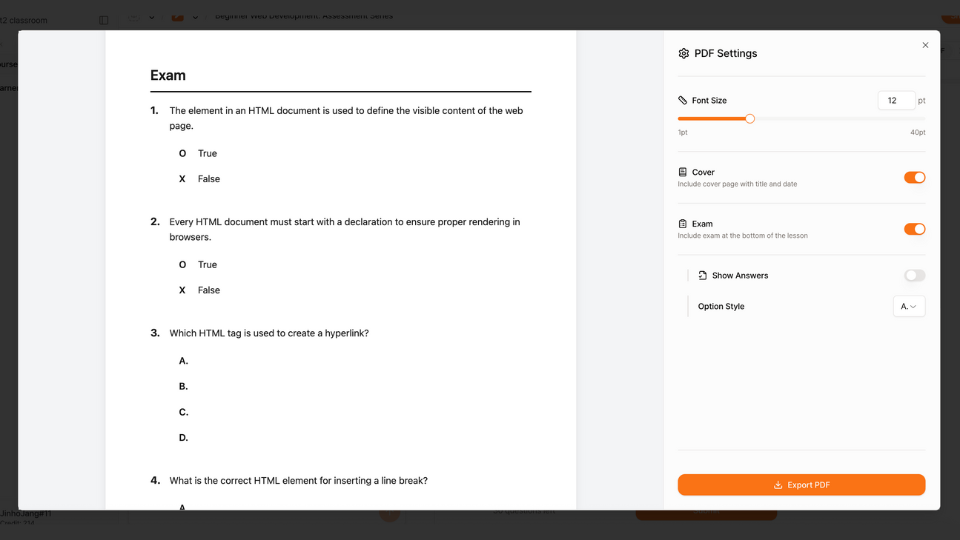
From a prompt or an existing course, TutorFlow can generate a structured teaching slide deck or convert online course materials into a PDF ebook. Slides export to PPTX for PowerPoint or Google Slides, to PDF for printing, and to DOCX, and a deck can be presented full screen or shared by public link.
Learner and Classroom Management
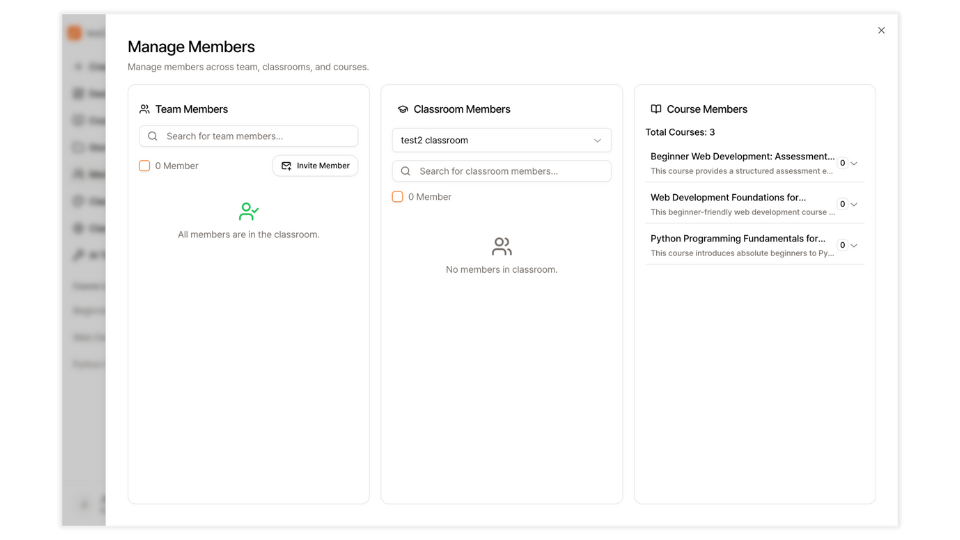
Each classroom gets a unique URL and serves as the central hub for a cohort, department, or program. You can add learners, assign courses, host multiple programs in one space, and monitor progress across the entire classroom.
Learning Analytics and AI Insights
TutorFlow tracks the data that matters to educators: learning time per learner and per course, completed lessons, active time split across content, AI tutor, and practice, top courses and learners, and a "Needs your attention" list of learners falling behind and submissions to review. Statistics export as XLSX or CSV, and Ask the AI answers questions about the classroom's records as a table you can download as CSV, XLSX, DOCX, or PDF.
Certificate Management
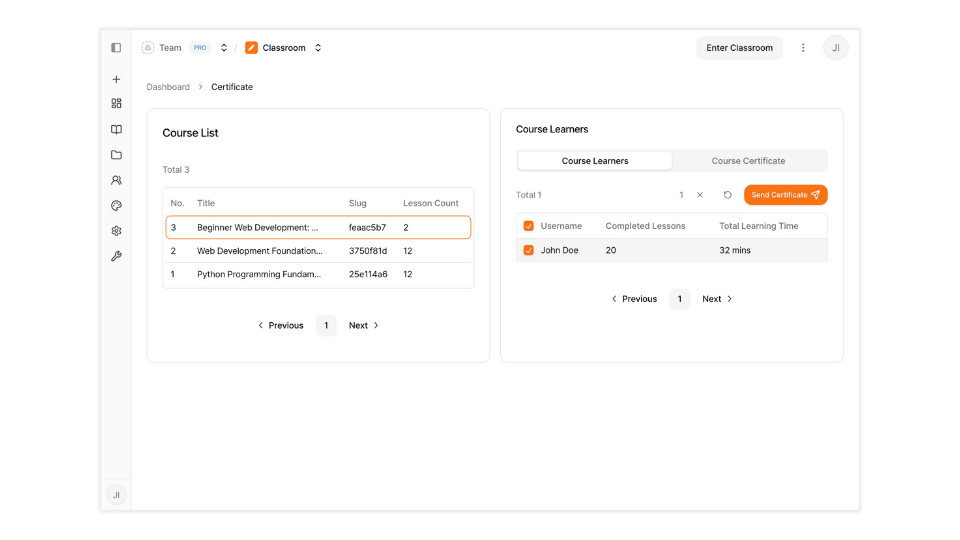
TutorFlow includes a certificate system you can customize per course or per learner. Certificates are managed alongside the rest of the classroom, so there is no separate tool or export step needed.
Narrated Teaching Videos
Describe a topic or paste your own script, and TutorFlow writes a scene-by-scene narration, voices it in one of six AI voices in the language you pick, and matches each scene with stock footage, a still image, a sketch, a slide from your deck, or a clip you upload. Edit every scene in the browser, record your own narration where you want it, add stickers and background music, and render the result to MP4 in 16:9 or 9:16. A rendered video has a watch page you can share or embed. See the Videos guide.
Learning Games
Give TutorFlow a practice objective and it plans a game, builds it as a single web page, and checks that it runs before you see it. Revise it in plain language, restore any earlier version, and share it with a link that works on classroom tablets without an install. See the Games guide.
Interactive Simulations
A simulation is a model learners perturb: TutorFlow writes down what it computes and which controls change it, builds the page, and drives every control to confirm the picture responds. Each one carries inquiry questions a learner can only answer by moving the controls. See the Simulations guide.
LMS Integration (LTI)
TutorFlow connects to Canvas, Moodle, Blackboard, and other LMSs as an LTI 1.3 tool. Teachers add TutorFlow courses, modules, slides, and tests directly inside an LMS course, students open them with single sign-on, and test scores flow back into the LMS gradebook automatically. See the LMS Integration (LTI) guide to get started.
Content API
Developers can connect a CMS, a curriculum database, or their own app to TutorFlow with the Content API. It creates, reads, updates, and syncs the courses, modules, videos, slides, tests, games, and simulations in a classroom, and expands existing lesson JSON into editable TutorFlow content. See the Content API overview and the Quickstart.
AI Teaching Tools
Beyond course creation, TutorFlow ships a suite of standalone AI tools for educators:
- OCR Math Formula Editor: Convert handwritten equations, formulas, and notes into digital text.
- Video Subtitle Generator: Upload a video and get subtitles generated instantly.
- Compare AI Responses: Put multiple models side by side on any prompt.
- AI Detector for Assignments: Review learner submissions for AI-assisted writing.
- Assignment Feedback Assistant: Draft structured, personalized feedback faster.
- TutorCampus: A learner-facing AI practice environment.
Popular Use Cases
TutorFlow is general-purpose, but most programs fit into one of a few common patterns. Each of the guides below goes deeper into how to structure courses for a specific context:
| Use case | What it covers |
|---|---|
| AI Literacy and Prompt Engineering | Teach learners to work with AI models, compare outputs, and evaluate responses critically |
| Coding and Programming | In-lesson code execution across 17 languages for bootcamps, CS courses, and developer training |
| Language Learning | Dictation, shadowing, roleplay, reading comprehension, and translation lessons with CJK support |
| Employee Onboarding | Structured new-hire programs with company context, role training, and progress tracking |
| Compliance Training | Policy delivery, scenario-based assessments, certification, and audit-ready records |
| Math and Science (STEM) | LaTeX formulas, AI-generated diagrams, and partial-credit grading for multi-step problems |
Every use case works with the same authoring flow. The differences are in course structure, lesson type mix, and assessment design, all of which are covered in the dedicated guides.
Get Started
Sign up at tutorflow.io/sign-up and follow the quickstart guide below. For questions or institutional onboarding, reach out at contact@tutorflow.io.
Learn More About TutorFlow